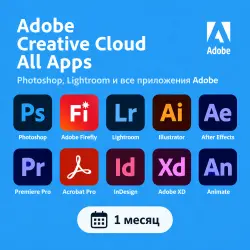
Photoshop, Lightroom, After Effects, Premiere Pro and all apps | 1 Month
Important notice
Any third-party trademarks, brand names, and product names referenced on this website are used solely to identify the relevant goods/services and, where applicable, to indicate intended purpose or compatibility. No affiliation, authorization, sponsorship, or endorsement by the trademark owners is implied unless expressly stated.
About the product
🔥 Official Adobe Creative Cloud Monthly Subscription
🔑 The key provides 1 month of access to all Adobe apps, including generative AI features and Generative Fill.
💻 The subscription allows you to use Adobe on 2 devices simultaneously using a single account. You can install the apps on 3 or more devices.
📦 The subscription includes:
• Photoshop
• Adobe Firefly
• Lightroom
• Illustrator
• After Effects
• Adobe Premiere Pro
• Acrobat Pro
• InDesign
• Adobe XD
• Animate
• Lightroom Classic
• Dreamweaver
• Audition
• InCopy
• Character Animator
• Capture
• Adobe Fresco
• Bridge
• Adobe Express
• Photoshop Express
• Media Encoder
• Aero
• Adobe Scan
• Fill & Sign
• Acrobat Reader
⚠️ IMPORTANT!
The key can only be activated on a personal Adobe account.
❌ Accounts registered in Russia (RF) or Belarus (RB) are not supported.
To avoid errors or account blocks, we recommend activating no more than 1 key per account.
If you see the message "Maximum number of activation codes exceeded..." during activation, you must create a new Adobe account and activate the key on that account.
📝 Activation Instructions:
1️⃣ Create a new Adobe account. When registering, select the USA or another country (excluding Russia and Belarus). Using an email address with a .RU domain is not recommended.
2️⃣ Log in to your account on the official Adobe website.
3️⃣ Go to https://redeem.adobe.com
4️⃣ Enter the key you received and activate it.
5️⃣ Verify your account via the email sent to your inbox. We recommend verifying your account immediately after registration.
🌐 Usage Recommendation
To minimize the risk of regional restrictions, we recommend using a спец. ПО or спец. ПО set to the same region as your account when activating and using Adobe apps. ⚠️ IMPORTANT: Refund Policy
Refunds are not available after the key has been successfully activated, including cases where you simply change your mind about using the subscription.
If the key fails to activate or you encounter issues using it, please contact us before attempting to activate it again yourself.
❗️Do not use multiple keys on a single account and follow the activation instructions to avoid subscription issues.
 Top up
 Games
Games Discounts 90%
 AI
AI Windows
 Subsctiptions
 New Games
 Mobile Games