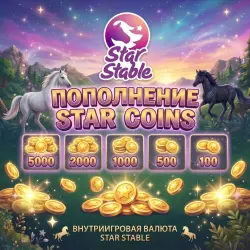
100 Star Coins | 5000 | 2000 | 1000 | 500 | 100 | ADDING Star Coins to YOUR account
Important notice
Any third-party trademarks, brand names, and product names referenced on this website are used solely to identify the relevant goods/services and, where applicable, to indicate intended purpose or compatibility. No affiliation, authorization, sponsorship, or endorsement by the trademark owners is implied unless expressly stated.
About the product
WE are online and ready to help with the top‑up!
Star Coins is a premium in‑game currency in the game Star Stable Online. With it, you can purchase content and in‑game features on Yurvik Island.
With Star Coins, you can buy:
- Horses
- Pets
- Clothing and outfits for your character
- Horse equipment
- Care items
- Certain in‑game services and features
✅ Available top‑up denominations:
- 100 Star Coins
- 500 Star Coins
- 1000 Star Coins
- 2000 Star Coins
- 5000 Star Coins
Choose the appropriate denomination and get currency for purchases in the world of Star Stable!
⚡️ Attention!
The in-game store content, the cost of horses, pets, outfits, and other items may be changed by the developer. Before making a purchase, we recommend checking the current terms and the availability of the required content in the game or on the official Star Stable website.
How does the replenishment process work?
1. Buy a product with the required amount of Star Coins.
2. After making the payment, contact us via the chat with the seller.
3. We will promptly credit you with Star Coins.
Please note that orders are processed in the order they are received. If you need the order to be processed instantly and you are not willing to wait, please check in the chat whether it is possible to activate it immediately before making the purchase.
After making the payment, wait for an email — we will promptly send you a detailed and secure instruction on how to activate the subscription.
 Top up
 Games
Games Discounts 90%
 AI
AI Windows
 Subsctiptions
 New Games
 Mobile Games