
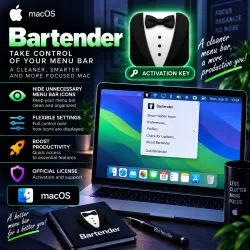
Bartender 7 MacOS key Lifetime
Important notice
Any third-party trademarks, brand names, and product names referenced on this website are used solely to identify the relevant goods/services and, where applicable, to indicate intended purpose or compatibility. No affiliation, authorization, sponsorship, or endorsement by the trademark owners is implied unless expressly stated.
About the product
🍸 Bartender 7 macOS — OFFICIAL LICENSE | LIFETIME
━━━━━━━━━━━━━━━━━━
🔑 Product Type — Digital License / Key
♾️ License Term — LIFETIME
🍏 Platform — macOS
📦 Version — Bartender 7
📧 License Delivery — to your e-mail
🔄 Updates supported
━━━━━━━━━━━━━━━━━━
📦 LICENSE OPTIONS
🔹 Digital license provided through the seller's partner account — delivered as an invitation link
🔹 License option linked to your personal e-mail address
⚠️ Please select the required license option before payment. Terms and pricing may vary depending on the selected option.
━━━━━━━━━━━━━━━━━━
📦 YOU RECEIVE
✅ Bartender 7 license for macOS
✅ Lifetime activation
✅ Selected digital license option
✅ Software updates
✅ License / activation information delivered to your e-mail
✅ Seller support for delivery and activation questions
━━━━━━━━━━━━━━━━━━
📧 HOW TO RECEIVE YOUR LICENSE
1️⃣ BEFORE clicking the “Buy” button, fill in the “E-mail” field.
2️⃣ Enter a valid e-mail address and make sure it is correct.
3️⃣ After your order is processed, the license will be sent to the specified e-mail.
4️⃣ Depending on the selected option, you will receive a digital license / invitation link or a license linked to your e-mail.
5️⃣ Check your Inbox and Spam/Junk folders.
⚠️ If you select the option linked to your personal e-mail, provide the exact e-mail address you want the license to be associated with.
━━━━━━━━━━━━━━━━━━
🔑 ACTIVATION
1️⃣ Install Bartender 7 on your Mac.
2️⃣ Receive the license at your specified e-mail address.
3️⃣ Open the invitation link or use the provided activation information, depending on the selected option.
4️⃣ Launch Bartender 7.
5️⃣ Complete the activation — done!
━━━━━━━━━━━━━━━━━━
🔥 BARTENDER 7 FEATURES
🔹 macOS menu bar management
🔹 Hide and show Menu Bar icons
🔹 Organize large numbers of menu bar items
🔹 Rearrange icons
🔹 Quick access to hidden items
🔹 Search for Menu Bar items
🔹 Custom keyboard shortcuts
🔹 Automatically show items based on specified conditions
🔹 Customize the behavior of individual items
🔹 Create a cleaner and more organized menu bar
🔹 Improve organization of your Mac workspace
🍏 Bartender helps reduce menu bar clutter while keeping your important applications and controls easily accessible.
━━━━━━━━━━━━━━━━━━
⚠️ BEFORE PURCHASE
📌 Version — Bartender 7.
📌 macOS only.
📌 Lifetime license.
📌 Updates are supported according to the selected license terms.
📌 Select the required license option before payment.
📌 Make sure you provide the correct e-mail during checkout.
📌 Check Bartender 7 compatibility with your macOS version and Mac model before purchasing.
━━━━━━━━━━━━━━━━━━
🕐 DELIVERY & SUPPORT
📨 License delivery — 05:00–19:00 Moscow Time (MSK)
🛠️ Store working hours — 09:00–00:00 Moscow Time (MSK)
🌙 Orders are processed according to the schedule above.
━━━━━━━━━━━━━━━━━━
🍸 Bartender 7
♾️ LIFETIME
🍏 macOS
📧 E-mail Delivery
🔄 Updates
 Top up
 Games
Games Discounts 90%
 AI
AI Windows
 Subsctiptions
 New Games
 Mobile Games