
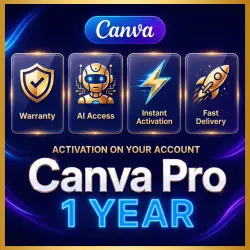
Canva Pro | 1-Year Access with Full AI Features (copy)
Important notice
Any third-party trademarks, brand names, and product names referenced on this website are used solely to identify the relevant goods/services and, where applicable, to indicate intended purpose or compatibility. No affiliation, authorization, sponsorship, or endorsement by the trademark owners is implied unless expressly stated.
About the product
💙 Canva Pro — 1-Year Premium Access with Full AI Features
🚀 Premium features are activated directly on your personal Canva account. There is no need to create a new account—you keep using your own profile with all the benefits of Canva Pro.
What's Included?
🎨 Canva Pro for 1 Year
👑 Full access to all premium templates, elements, and design tools.
🖼️ Millions of premium photos, videos, graphics, and illustrations.
✨ One-click Background Remover.
📐 Professional design features and advanced editing tools.
📁 Unlimited folders and access to Brand Kit.
📲 Thousands of ready-made templates for social media, presentations, marketing, and more.
☁️ Access from any device — desktop, tablet, or mobile.
🤖 AI-Powered Features
Unlock Canva's powerful AI tools:
✍️ Magic Write — AI-powered text generation.
🎨 Magic Design — Instantly create professional designs with AI.
🖌️ Magic Edit — Edit images using artificial intelligence.
🧠 Canva AI Assistant — Generate designs and content from simple prompts.
🖼️ AI Image Generator (Text to Image).
🎬 AI Video Generator (Text to Video).
🔊 AI Voice — AI-powered voice generation.
🧩 Canva Code — Build interactive content without coding.
🎞️ Magic Media — Generate AI images and videos.
⚡ After Your Purchase
✅ Fast activation.
💬 Responsive customer support.
🎁 A perfect gift for designers, students, teachers, entrepreneurs, and content creators.
🔒 Your Privacy Matters
Your subscription is activated only on your personal Canva account.
All your projects, files, and workspace remain completely private and belong exclusively to you. No one else can access or view your work.
If you would like to share a project, simply use Canva's Share feature. Otherwise, your files remain private and visible only to you, in accordance with Canva's privacy and sharing settings.
 Top up
 Games
Games Discounts 90%
 AI
AI Mobile Games
 Game Pass
 New Games
 Subsctiptions