
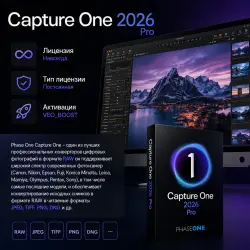
Capture One 2026 Pro, License / Lifetime / Automatic Issue
Important notice
Any third-party trademarks, brand names, and product names referenced on this website are used solely to identify the relevant goods/services and, where applicable, to indicate intended purpose or compatibility. No affiliation, authorization, sponsorship, or endorsement by the trademark owners is implied unless expressly stated.
License, Lifetime.
Capture One allows you to apply multiple adjustments to the same image. The original RAW file is used as a template, not the result of previous adjustments. The working area is divided into several sections, equal to the number of adjustments on the original digital negative. White balance is adjusted using the color temperature and tint controls. You can also select scene modes, which are common in many cameras. You can also use the eyedropper tool. This tool specifies a neutral gray point in the photo, from which the white balance is adjusted.
The program allows you to optimize the dynamic range. If there are excessively dark or bright areas in the photo, you can bring them out using shadow and highlight recovery. You can turn on and off highlight enhancement for highlights and shadows. Noise reduction in photos is performed in two ways: you can suppress both graininess and the color component of noise. Capture One has always distinguished itself from its competitors with its unique image sharpening algorithm. Photos converted with this RAW converter appear slightly sharper than those of competitors.
Capture One is designed as an all-in-one solution, reducing the need for post-processing, which means you don't need to use Photoshop for image processing. Simple tools, a straightforward menu, and clear labels make the complex process of RAW file processing simple, intuitive, and effortless.
Program features:
Import photos with preview.
Batch processing of photos with preset settings.
Simultaneous conversion of one RAW file to multiple formats.
Proper support for ICC color profiles.
Correction of chromatic aberrations, distortion, vignetting, and other optical defects.
Fine-tune color tones and white balance using the adjustment wheel.
A separate panel for adjusting skin tones, with the ability to save presets.
Split toning, globally or by control points, directly on the photo using the color editor.
Support for the most popular DSLR and digital backs from Phase One.
Direct image capture from cameras when connected via cable or Wi-Fi.
Overlay function for composition and design.
Support for working on multiple monitors.
🔰PURCHASE TERMS🔰
🟣Purchases are non-refundable for the following reasons:
◻️ I purchased the wrong product ◻️ I paid accidentally ◻️ It does not meet the program requirements ◻️ It does not work
🟣The product is issued automatically and is non-refundable.
✔️ By purchasing this product, you agree to these terms.✔️
Enjoy using it.💘 hide
 Top up
 Games
Games Discounts 90%
 AI
AI Windows
 Subsctiptions
 New Games
 Mobile Games