
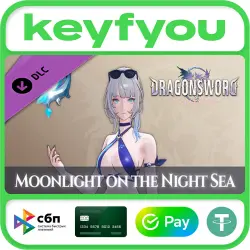
DLC DragonSword : Awakening - Costume : Moonlight on the Night Sea / STEAM GLOBAL DLC KEY
Important notice
Any third-party trademarks, brand names, and product names referenced on this website are used solely to identify the relevant goods/services and, where applicable, to indicate intended purpose or compatibility. No affiliation, authorization, sponsorship, or endorsement by the trademark owners is implied unless expressly stated.
You will receive a STEAM key automatically after payment, the store operates 24/7 ✅
Release date: 6 Aug, 2026
Developer: Hound13 Inc.
Publisher: Hound13 Inc.
Localization: English and other languages
Activation system: Steam
Region: GLOBAL 🌐
Requires DragonSword : Awakening to run
- Costume : Moonlight on the Night Sea
- Weapon Appearance : Star upon the Waves
[Costume : Moonlight on the Night Sea]
Cerese's summer outfit, pairing a calm navy swimsuit with black ribbons.
Even under the blazing sun, her gaze glimmers as cool as the midnight moon.
[Weapon Appearance : Star upon the Waves]
Cerese's arcane device, where stars imbued with blue starlight ripple like the tide.
It appears to float calmly, but the moment magic touches it, it surges outward like a blue wave.
[How to Obtain In-Game After Purchasing the Costume DLC]
1. Press "ESC" on the keyboard or the "≡" button on the gamepad to enter the "Main Menu"
2. Select the "Hero" menu
3. Select the character of the purchased costume
4. Select the hanger-shaped icon at the bottom left
5. Select and equip the outfit you want
※ If purchased while the game is running, it can be confirmed after restarting the game.
※ Costumes can be used after obtaining the corresponding hero. Heroes can be obtained by completing quests or through the Exchange.
We would be glad if you leave us a positive review - it is very important to us.
If you have any difficulties, please contact us and we will try to help you as quickly as possible.
*Refunds are not possible in the following cases: the purchase was made by mistake, you changed your mind or you did not take into account the region.
*The composition of the edition can be changed by the publisher unilaterally, the seller has no influence on this.
- You need to download and install Steam https://store.steampowered.com/about/ (if not already installed).
- Register a new account or log in to an existing one.
- Go to the "My games" section and select "Activate via Steam" and enter the key.
- After activation, the game will appear in the list of games and you can download it.
 Top up
 Games
Games Discounts 90%
 AI
AI Windows
 Subsctiptions
 New Games
 Mobile Games