


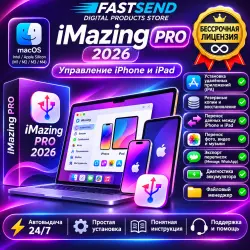
iMazing PRO 2026 for macOS | iPhone - iPad Manager | Backup & Data Transfer
Important notice
Any third-party trademarks, brand names, and product names referenced on this website are used solely to identify the relevant goods/services and, where applicable, to indicate intended purpose or compatibility. No affiliation, authorization, sponsorship, or endorsement by the trademark owners is implied unless expressly stated.
About the product
🍏 **IMAZING PRO 2026 FOR macOS — IPHONE & IPAD MANAGEMENT**
Manage your Apple devices from your Mac with iMazing. Transfer files, create backups, export supported messages and organize your iPhone or iPad data with convenient desktop tools.
━━━━━━━━━━━━━━━━━━━━━━
✨ **MAIN FEATURES:**
💾 **Backup & Restore**
• Create and manage device backups.
• Back up supported data and restore it when needed.
• Manage backup history.
🔄 **Data Transfer**
• Transfer data between compatible Apple devices.
• Move files without relying entirely on cloud storage.
📸 **Photos, Videos & Music**
• Import and export media files.
• Manage photos, videos and music from your Mac.
💬 **Messages & Conversations**
• Export supported iMessage and WhatsApp conversations.
• Save messages and attachments in available formats.
📂 **File Management**
• Browse and manage accessible files and app documents.
• Organize supported content on your device.
🔋 **Device Information**
• View available battery and device information.
• Check supported device statistics.
━━━━━━━━━━━━━━━━━━━━━━
💻 **COMPATIBILITY:**
✅ macOS
✅ Intel-based Mac computers
✅ Apple Silicon Macs (M1 / M2 / M3 / M4), subject to software compatibility
✅ Compatible iPhone and iPad devices
✅ Some functions depend on the iOS version and device model.
━━━━━━━━━━━━━━━━━━━━━━
📦 **WHAT YOU RECEIVE:**
• iMazing software download
• Installation instructions
• Basic usage guide
• FASTSEND customer support
⚡ **DELIVERY:**
1. Complete your purchase.
2. Receive the download link and instructions.
3. Install the software on your Mac.
4. Connect your iPhone or iPad and use the available features.
━━━━━━━━━━━━━━━━━━━━━━
📌 **IMPORTANT INFORMATION:**
• iMazing is third-party software and is not affiliated with Apple.
• License type and duration depend on the activation details supplied with your order.
• Check macOS and device compatibility before purchasing.
• Always create a backup before making changes to your device.
• Some advanced functions may require additional permissions or compatible device settings.
💬 Need help? Contact FASTSEND through the order chat.
❤️ **FASTSEND — DIGITAL SOFTWARE & PRODUCTS**
iMazing Pro Mac, iMazing macOS, iMazing 2026, iPhone Manager for Mac, iPad Manager Mac, iPhone Backup Mac, iOS Data Transfer, iPhone File Manager, iMessage Export, WhatsApp Export, Apple Device Management, FASTSENDiMazing Pro для Mac, iMazing macOS, iMazing 2026, управление iPhone на Mac, управление iPad на Mac, резервная копия iPhone, перенос данных iOS, файловый менеджер iPhone, экспорт iMessage, экспорт WhatsApp, программа для macOS, FASTSEND
 Top up
 Games
 Steam Sales
 AI
 Subscriptions
 Windows
 New Games
 Mobile Games