
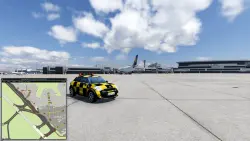
DLC JARDesign FollowMe Car for X-Plane 12
Important notice
Any third-party trademarks, brand names, and product names referenced on this website are used solely to identify the relevant goods/services and, where applicable, to indicate intended purpose or compatibility. No affiliation, authorization, sponsorship, or endorsement by the trademark owners is implied unless expressly stated.
Follow Me Car (FMCar) is a plugin for X-Plane 12 that adds an interactive airport map and realistic taxi guidance with a Follow Me Vehicle — just like in realworld aviation.
The plugin helps you quickly and clearly orient yourself at any airport, plan taxiroutes, and follow them without unnecessary guesswork.
Windows Only
Key features:
Interactive Airport Map:
Displays runways, taxiways, aprons, gates/stands, and the aircraft's current,
user can change the map scale,
user can change the map window size,
user can change the font size,
move the map to any position on the screen,
automate showing and hiding the map.
One-Click Taxi Route Planning
You can build a route to:
A runway end,
A taxiway,
A gate/stand,
Any point by double-clicking directly on the map.
ATC ROUTE — As in Real Life
Step-by-step taxi route building following the logic of ATC instructions: you
select taxiways and the final point just as it sounds in real ATC clearances.
Visual route guidance:
Clearly visible taxi path,
Correct turns,
Easy orientation at complex airfields.
Automatic Behavior
The plugin automatically:
Detects the current airport,
Loads data upon landing,
Clears the route when the position or airport changes.
 Top up
 Games
Games Discounts 90%
 AI
AI Mobile Games
 Game Pass
 New Games
 Subsctiptions