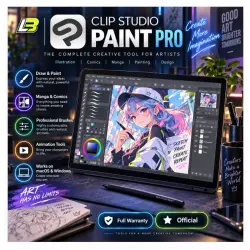
Clip Studio Paint PRO 4 activation key
Important notice
Any third-party trademarks, brand names, and product names referenced on this website are used solely to identify the relevant goods/services and, where applicable, to indicate intended purpose or compatibility. No affiliation, authorization, sponsorship, or endorsement by the trademark owners is implied unless expressly stated.
About the product
🎨 Clip Studio Paint Pro 4.0
Activation service for Clip Studio Paint Pro 4.0 on Windows and macOS.
Choose the plan that fits your needs and receive official activation information after processing.
━━━━━━━━━━━━━━━━━━━━━━
📦 Available Options
✔ 3-Month Plan
✔ Annual Subscription
✔ One-Time Purchase
Please choose carefully before placing your order.
━━━━━━━━━━━━━━━━━━━━━━
📌 Account Requirements
After payment, send only the email address you want to use for activation.
⚠️ Special rule for the 3-Month option:
The email must never have been used previously to create a Clip Studio Paint account.
Other subscription options work with either:
✅ Existing accounts
✅ New accounts
Please double-check the email address before sending it.
━━━━━━━━━━━━━━━━━━━━━━
📩 How Activation Works
Once your order is processed, Clip Studio Paint will send an official activation email.
The email includes:
✅ Activation key
✅ Activation instructions
✅ Information needed to complete setup
Follow the provided steps to finish activation.
━━━━━━━━━━━━━━━━━━━━━━
⚡ Delivery Schedule
Orders are processed during our working hours:
🕖 7:00 AM to 9:00 PM
Cambodia Time, ICT / GMT+7
Support is also available during these hours for activation-related questions.
━━━━━━━━━━━━━━━━━━━━━━
🖌️ Create With Flexible Drawing Tools
Clip Studio Paint Pro provides tools for digital illustration, painting, manga, and comic creation.
Features include:
✔ Customizable brushes
✔ Pens and pencils
✔ Pressure sensitivity support
✔ Digital painting tools
✔ Illustration-focused workflows
━━━━━━━━━━━━━━━━━━━━━━
📐 Vector + Raster Workflow
Work with both major layer types:
🔹 Vector Layers
Useful for scalable lines and editable artwork
🔹 Raster Layers
Suitable for detailed painting and pixel-based work
Use either method or combine both in the same project.
━━━━━━━━━━━━━━━━━━━━━━
📚 Comic & Manga Tools
Built-in tools help with comic production and page planning.
✔ Comic panels
✔ Speech balloons
✔ Storyboarding
✔ 3D reference models
✔ Manga layouts
✔ Webtoon workflows
━━━━━━━━━━━━━━━━━━━━━━
💻 Supported Systems
🪟 Windows
🍎 macOS
Please confirm your system compatibility before ordering.
━━━━━━━━━━━━━━━━━━━━━━
☁️ Cloud Features
Supported cloud tools help you:
✔ Sync projects across devices
✔ Access supported files from different devices
✔ Continue work from another compatible system
━━━━━━━━━━━━━━━━━━━━━━
🔑 What You Receive
✅ Official activation email
✅ Activation key
✅ Setup instructions
✅ Access according to your selected plan
✅ Assistance with activation problems
━━━━━━━━━━━━━━━━━━━━━━
🎯 Good Fit For
🎨 Illustrators
📚 Comic artists
🖌️ Digital painters
📱 Webtoon creators
✏️ Manga artists
💻 Creators working on Windows or Mac
━━━━━━━━━━━━━━━━━━━━━━
📌 Before Ordering
• For the 3-Month option, use an email never previously registered with Clip Studio Paint
• Other plans support old or new accounts
• Send the correct email after payment
• Select the correct subscription or purchase option before processing
Once activation is complete, you are ready to start creating with Clip Studio Paint Pro 4.0.
 Top up
 Games
Games Discounts 90%
 AI
AI Windows
 Subsctiptions
 New Games
 Mobile Games