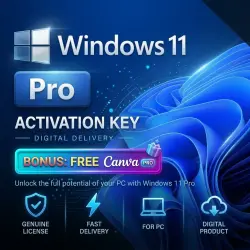
Windows 11 Pro Activation Key + Canva Pro FREE Bonu
Important notice
Any third-party trademarks, brand names, and product names referenced on this website are used solely to identify the relevant goods/services and, where applicable, to indicate intended purpose or compatibility. No affiliation, authorization, sponsorship, or endorsement by the trademark owners is implied unless expressly stated.
About the product
# 🔥 Windows 11 Pro Activation Key + Canva Pro FREE Bonus
Upgrade your PC experience with **Windows 11 Pro** using a digital activation key. As an additional bonus, you'll also receive **Canva Pro access for FREE!**
Get the essential tools for productivity, creativity, and everyday work in one purchase.
## 💻 Product Details
- **Main Product:** Windows 11 Pro Activation Key
- **Bonus:** Canva Pro FREE
- **Delivery:** Digital delivery
- **Platform:** Windows PC
- **Windows Edition:** Professional
- **Physical Shipping:** Not required
## 🔑 How to Activate Windows 11 Pro
1. Make sure Windows 11 Pro is already installed on your computer.
2. Open **Settings** on your PC.
3. Navigate to **System → Activation**.
4. Click **Change product key**.
5. Enter the activation key provided after purchase.
6. Follow the on-screen instructions to complete activation.
7. Return to the Activation page to verify your activation status.
## 🎁 FREE Canva Pro Bonus
Your purchase also includes a Canva Pro bonus. Follow the instructions provided after your order to receive the bonus access.
## ⚠️ Important Information
- The activation key is intended for **Windows 11 Pro only**. It will not activate Windows 11 Home.
- Please verify your Windows edition before purchasing.
- Check the license type and any applicable region or device restrictions.
- OEM and Retail licenses have different transfer rights.
- Activation depends on key compatibility and Microsoft's activation requirements.
- Please read the entire product description before placing your order.
## 🛠️ Customer Support
Experiencing an activation issue?
Contact me through **GGSEL chat** and provide:
- Your order number.
- A screenshot of the activation error.
- A brief description of the issue.
I'll help you troubleshoot the problem.
**Thank you for your purchase! ❤️**
 Top up
 Games
 Steam Sales
 AI
 Subscriptions
 Windows
 New Games
 Mobile Games