
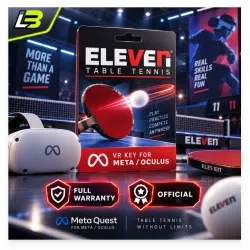
Eleven Table Tennis Key for Meta/Oculus Quest-VR
Important notice
Any third-party trademarks, brand names, and product names referenced on this website are used solely to identify the relevant goods/services and, where applicable, to indicate intended purpose or compatibility. No affiliation, authorization, sponsorship, or endorsement by the trademark owners is implied unless expressly stated.
🎮 META QUEST DIGITAL GAME | PRODUCT & ACTIVATION GUIDE
━━━━━━━━━━━━━━━━━━━━
📦 PRODUCT OVERVIEW
🎯 Platform: Meta / Oculus Quest Store
🕹️ Product Format: Digital Game
🌎 Regional Availability: ✅ Global / Worldwide ✅ Russia*
📌 Important: Game redemption requires a connection with an IP address outside Russia.
━━━━━━━━━━━━━━━━━━━━
🚨 IMPORTANT: READ BEFORE ACTIVATION
Have you previously downloaded, tested, installed, or redeemed this game?
✅ Please notify our support team immediately after placing your order.
🤝 Our team will provide assistance to help you complete the redemption process successfully.
❗ Refund Conditions
If you do not disclose your previous game activity and your activation code fails due to redemption restrictions, your purchase will not be eligible for a refund.
━━━━━━━━━━━━━━━━━━━━
⚡ LICENSE CODE DELIVERY
Your digital game code will be sent during our scheduled delivery hours.
🕖 Daily Delivery Schedule: 07:00 AM – 10:00 PM
🇰🇭 Time Zone: Cambodia (ICT / GMT+7)
━━━━━━━━━━━━━━━━━━━━
🎧 CUSTOMER SUPPORT
Need assistance with your purchase or activation? Our support operators are here to help.
👨💻 Live Support Hours: 09:30 AM – 02:00 AM (Next Day)
🇰🇭 Cambodia Local Time
💬 For questions, redemption errors, or order-related concerns, please message our team.
🚀 We aim to resolve your issues as quickly as possible.
━━━━━━━━━━━━━━━━━━━━
🛡️ PURCHASE PROTECTION & SERVICE
✔ Guaranteed product functionality
✔ Assistance before placing an order
✔ Technical support after purchase
🛒 Looking for more digital products?
Browse our store for discounted VR games, software, and subscription services.
━━━━━━━━━━━━━━━━━━━━
🔑 HOW TO ACTIVATE YOUR GAME
Two redemption methods are available. Follow the instructions for your preferred device.
🌐 OPTION 01 | META STORE WEBSITE
Step 1: Visit the product page for your game or application.
Step 2: Open the More (⋯) menu or the available dropdown menu.
Step 3: Find and select "Redeem Gift" or "Receive Gift".
Step 4: Enter your 25-digit activation key to complete redemption.
━━━━━━━━━━━━━━━━━━━━
📲 OPTION 02 | META HORIZON MOBILE APP
Step 1: Open the Meta Horizon App and locate your purchased game.
Step 2: Tap the three-dot (⋮) icon at the top-right of the screen.
Step 3: Choose "Redeem Gift" or "Receive Gift" from the available options.
Step 4: Submit your 25-digit game code to activate your purchase.
━━━━━━━━━━━━━━━━━━━━
🧰 ACTIVATION ERROR? TRY THESE SOLUTIONS
If the product price or gift redemption option is missing, follow these troubleshooting steps.
🌍 01 | VERIFY YOUR CONNECTION
✅ Connect through a supported region using an IP address outside the restricted territory.
🔐 02 | CHECK YOUR спец. ПО
Certain спец. ПО connections might be blocked or fail to display the redemption option.
To resolve this:
① Exit the Meta Horizon App or browser completely.
② Activate your спец. ПО before reopening the app or website.
③ Return to the product page and check the redemption option again.
④ If the issue continues, switch to another спец. ПО provider or supported network.
━━━━━━━━━━━━━━━━━━━━
💬 WE'RE HERE TO HELP
Still experiencing difficulties? Contact our customer service team with your order information for further assistance.
🛍️ Thank you for choosing our store!
🎮 Enjoy your new Meta Quest game!

 Top up
 Games
Games Discounts 90%
 AI
AI Windows
 Subsctiptions
 New Games
 Mobile Games