
KONATUS One-Click PC Cleaner | Windows 10/11
Important notice
Any third-party trademarks, brand names, and product names referenced on this website are used solely to identify the relevant goods/services and, where applicable, to indicate intended purpose or compatibility. No affiliation, authorization, sponsorship, or endorsement by the trademark owners is implied unless expressly stated.
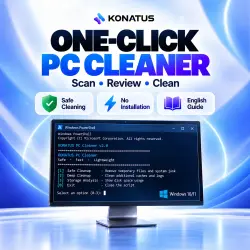
KONATUS helps you review cleanup candidates, analyze storage, and start cleanup only after your approval.
Safe Cleanup checks temporary files and defined application caches. Deep Cleanup adds rebuildable caches, selected logs, and eligible old system components using Windows tools. Storage Analysis shows large files and space-consuming folders without deleting them. The program displays scanned locations, progress, deleted-file totals, and disk space before and after.
Documents, photos, downloads, saved passwords, and browser sessions are not automatic cleanup targets. Detected files in use are skipped.
Includes a BAT/PowerShell script and an English user guide. Requires Windows 10 or 11, PowerShell 5.1, and administrator permission. No installation or internet connection is required. Enterprise security policies may block execution. Cleanup is permanent; save open work first. The amount of space freed and any speed improvement vary by computer and are not guaranteed. Do not disable security software if it blocks the script.
 Top up
 Games
Games Discounts 90%
 AI
AI Windows
 Subsctiptions
 New Games
 Mobile Games