
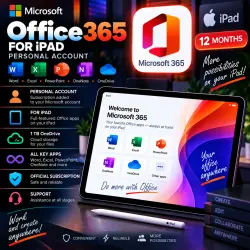
Microsoft Office 365 for iPad 12-month account
Important notice
Any third-party trademarks, brand names, and product names referenced on this website are used solely to identify the relevant goods/services and, where applicable, to indicate intended purpose or compatibility. No affiliation, authorization, sponsorship, or endorsement by the trademark owners is implied unless expressly stated.
About the product
📱 Microsoft Office 365 for iPad — 12-MONTH SUBSCRIPTION
━━━━━━━━━━━━━━━━━━
📅 Subscription Term — 12 Months
📱 Main Platform — iPad / iPadOS
⚡ Automatic ready-account delivery — 24/7
👤 Access — Personal Account or subscription for your own account
☁️ 1 TB OneDrive option available
━━━━━━━━━━━━━━━━━━
🔥 PRODUCT OPTIONS
1️⃣ PERSONAL ACCOUNT — WITHOUT ONEDRIVE
💰 799 RUB
👤 You receive a ready-to-use personal account
🔐 Format — Login + Password
🔑 Password can be changed
📧 Account e-mail address CANNOT be changed
❌ 1 TB OneDrive is not included
⚡ Automatic account delivery — 24/7
2️⃣ OFFICE 365 + 1 TB ONEDRIVE — YOUR PERSONAL ACCOUNT
💰 1549 RUB
👤 Subscription is added to your personal Microsoft Account
☁️ OneDrive — 1 TB
📦 Office 365 included
📨 Activation via invitation (Invite)
🕐 Processing — 09:00–00:00 Moscow Time (MSK)
⚠️ Please select the correct product option before payment.
━━━━━━━━━━━━━━━━━━
📦 MAIN APPS FOR iPad
✅ Microsoft Word
✅ Microsoft Excel
✅ Microsoft PowerPoint
✅ Microsoft Outlook
✅ Microsoft OneNote
✅ Microsoft Teams
📌 Available applications and features may depend on the platform, selected subscription option and current Microsoft terms.
━━━━━━━━━━━━━━━━━━
📱 WHAT YOU CAN DO
🔹 Create and edit Word documents
🔹 Work with Excel spreadsheets
🔹 Create and edit PowerPoint presentations
🔹 Use Outlook for e-mail
🔹 Work with OneNote notes
🔹 Use Microsoft Teams
🔹 Open and edit compatible documents on iPad
🔹 Use OneDrive cloud storage with the 1 TB option
━━━━━━━━━━━━━━━━━━
👤 READY ACCOUNT OPTION
1️⃣ Select the option without OneDrive.
2️⃣ Complete your purchase.
3️⃣ Receive the login and password automatically.
4️⃣ Sign in to the provided account.
5️⃣ We recommend changing the password after receiving access.
⚠️ The e-mail / login of the provided account cannot be changed.
━━━━━━━━━━━━━━━━━━
☁️ YOUR PERSONAL ACCOUNT OPTION
1️⃣ Select Office 365 + 1 TB OneDrive.
2️⃣ Provide the information required to process the invitation.
3️⃣ The subscription is provided to your personal account via Invite.
4️⃣ After processing, check your subscription and OneDrive access.
🕐 Personal account processing hours:
09:00–00:00 Moscow Time (MSK)
━━━━━━━━━━━━━━━━━━
⚠️ BEFORE PURCHASE
📌 Subscription term — 12 months.
📌 Main product platform — iPad.
📌 799 RUB — ready personal account WITHOUT 1 TB OneDrive.
📌 1549 RUB — Office 365 + 1 TB OneDrive for your personal account via Invite.
📌 For the ready account, the password can be changed, but the account e-mail cannot.
📌 Access and Publisher are not iPad applications.
📌 Make sure you select the correct product option before payment.
━━━━━━━━━━━━━━━━━━
📱 Microsoft Office 365
📅 12 MONTHS
🍏 iPad / iPadOS
⚡ 24/7 Auto Delivery
☁️ 1 TB OneDrive Option
 Top up
 Games
Games Discounts 90%
 AI
AI Windows
 Subsctiptions
 New Games
 Mobile Games