
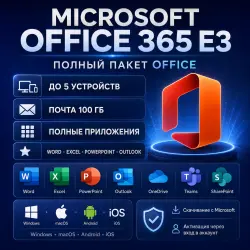
Microsoft Office 365 Pro Plus | 5 Devices | Win/Mac
Important notice
Any third-party trademarks, brand names, and product names referenced on this website are used solely to identify the relevant goods/services and, where applicable, to indicate intended purpose or compatibility. No affiliation, authorization, sponsorship, or endorsement by the trademark owners is implied unless expressly stated.
# Microsoft Office 365 Pro Plus | 5 Devices | Win/Mac
### Microsoft Office 365 Pro Plus – 5 Devices
Get access to Microsoft Office 365 Pro Plus with a ready-to-use account for **Windows and macOS**.
### ✅ What You Receive
* Microsoft Office 365 account
* Username + Password
* Use on up to **5 devices**
* Compatible with **Windows & macOS**
* All interface languages supported
* Global use
* Password can be changed after first login
* Access to Microsoft Office desktop applications
### 📦 Included Office Apps
* Microsoft Word
* Microsoft Excel
* Microsoft PowerPoint
* Microsoft Outlook
* Microsoft OneNote
* Microsoft Access — Windows only
* Publisher — where supported
### 🔑 How to Activate
1. Sign out of any existing Microsoft Office account.
2. Open the official Microsoft Office / Microsoft 365 portal.
3. Sign in using the Username and Password provided after purchase.
4. Change the password if requested during the first login.
5. Download and install Office.
6. Sign in to activate your Office applications.
### 📋 Product Details
**Product:** Microsoft Office 365 Pro Plus
**Devices:** Up to 5
**Operating Systems:** Windows / macOS
**Languages:** All languages
**Region:** Global
**Delivery:** Digital account
**Delivery Time:** Within 12 hours
**Product Key:** Not included — activation is through the provided account
**OneDrive Storage:** Not included
### ⚠️ Important
This product is delivered as an **Office 365 account with Username and Password**, not as a license key.
Please remove or sign out of any previously activated Office account before installation to avoid activation conflicts.
 Top up
 Games
Games Discounts 90%
 AI
AI Windows
 Subsctiptions
 New Games
 Mobile Games