
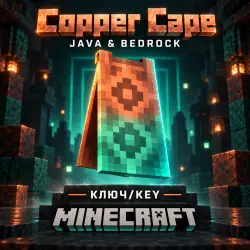
MINECRAFT | COPPER CAPE | SKIN | JAVA & BEDROCK | KEY
Important notice
Any third-party trademarks, brand names, and product names referenced on this website are used solely to identify the relevant goods/services and, where applicable, to indicate intended purpose or compatibility. No affiliation, authorization, sponsorship, or endorsement by the trademark owners is implied unless expressly stated.
🎯 Why choose us?
• ⚡ Automatic product delivery after payment.
• 🎮 After payment, you will automatically receive a key to claim rewards in MINECRAFT.
• 🛡️ Our store guarantees reliability!
⚠️ ATTENTION ⚠️
❗️ THIS KEY CAN BE ACTIVATED FOR BOTH BEDROCK EDITION AND JAVA EDITION
❓What do you get when buying this license key❓
✅ Minecraft - Copper Cape
❗️Additional information❗️
🛠️ If you encounter any issues with the key, please contact us. We will resolve the problem or provide a replacement if proof is provided.
🎥 An unedited video of the purchase and activation process serves as your guarantee in the event of a dispute.
🔴MINECRAFT - Copper Cape codes have an expiration date; please activate the code immediately after purchase ⏳
✅How do I activate the key?✅
1️⃣ Go to the official activation site — 🔗 https://account.microsoft.com/billing/redeem
2️⃣ Enter the activation code received after purchase and confirm your login to your Minecraft (Microsoft) account.
3️⃣ After successful activation, launch Minecraft: Bedrock Edition to sync the cape with your profile.
4️⃣ ⚠️ Please note: Capes may not appear immediately in the Java version or might show up with a slight delay; this is normal and does not affect the activation status.
⚠️ CAPE NOT SHOWING UP IN JAVA EDITION? ⚠️
🛠️ Try the following method:
1️⃣ Download and launch Minecraft: Bedrock Edition.
2️⃣ Log in with the same Microsoft account used to activate the key.
3️⃣ Select and equip the acquired cape in Bedrock Edition.
4️⃣ Then, launch Minecraft: Java Edition again. ✅ Usually, after selecting a cape in Bedrock Edition, it also begins to appear in Java Edition.
⏳ Synchronization may take some time. If the cape doesn't appear immediately, wait a little while or restart the launcher.
 Top up
 Games
Games Discounts 90%
 AI
AI Windows
 Subsctiptions
 New Games
 Mobile Games