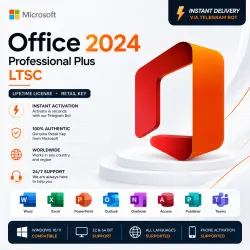
Office Professional Plus 2024 LTSC | Phone Activation | Telegram Bot | Worldwide
Important notice
Any third-party trademarks, brand names, and product names referenced on this website are used solely to identify the relevant goods/services and, where applicable, to indicate intended purpose or compatibility. No affiliation, authorization, sponsorship, or endorsement by the trademark owners is implied unless expressly stated.
🔑 Microsoft Office Professional Plus 2024 LTSC
Original Retail License • Fast Delivery • Worldwide
Activate Microsoft Office Professional Plus 2024 LTSC quickly and easily using our Telegram CID Bot. Enter your product key, select Phone Activation, send your Installation ID to the bot, and receive your Confirmation ID (CID).
✅ What's Included
* Microsoft Office Professional Plus 2024 LTSC Product Key
* Prime Hub CID Bot activation credit
* Fast automated Phone Activation
* Lifetime license for one Windows PC
* Step-by-step activation instructions
* Customer support if needed
📦 Office Applications
* Word
* Excel
* PowerPoint
* Outlook
* OneNote
* Access
* Publisher
* Teams
⚙️ Product Details
* Version: Office Professional Plus 2024 LTSC
* License Type: Retail
* Activation Method: Phone Activation via Telegram Bot
* Platform: Windows 10 / Windows 11
* Architecture: 32-bit & 64-bit
* Language: All languages
* Region: Worldwide
* Delivery: Instant
⚡ Activation Process
1. Install Microsoft Office Professional Plus 2024 LTSC.
2. Enter the supplied product key.
3. Select "I want to activate the software by telephone" (Phone Activation).
4. Open our Telegram CID Bot.
5. Redeem your activation credit using:
/redeem YOUR-CODE
6. Send your Installation ID to the bot.
7. Receive your Confirmation ID (CID).
8. Enter the CID into the Office activation window.
9. Complete activation.
⚡ Fast and convenient activation — no phone call required.
📌 Important
* Activate the product key within 30 days of purchase.
* The product key is intended for one Windows PC.
* Phone Activation must be selected when prompted.
* Major hardware changes or reinstalling Windows may require reactivation.
* If you experience any activation problems, contact us before making changes to your Office installation.
💬 Support
Telegram: https://t.me/Primee_hub
Thank you for choosing Prime Hub.
 Top up
 Games
Games Discounts 90%
 AI
AI Windows
 Subsctiptions
 New Games
 Mobile Games