
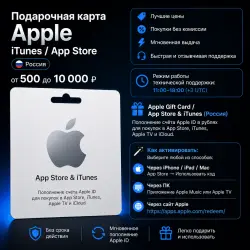
Apple Gift Card for Russia (App Store & iTunes) — 500 to 10,000 RUB
Important notice
Any third-party trademarks, brand names, and product names referenced on this website are used solely to identify the relevant goods/services and, where applicable, to indicate intended purpose or compatibility. No affiliation, authorization, sponsorship, or endorsement by the trademark owners is implied unless expressly stated.
👋 Welcome!
Here's what you get:
✨ Great prices
⚡ Instant delivery after purchase
💳 No hidden fees
💬 Fast and responsive customer support
🕒 Support Hours: 11:00 AM – 6:00 PM (MSK, UTC+3)
━━━━━━━━━━━━━━━━━━━━
🎁 Apple Gift Card for Russia
Top up your Russian Apple ID balance and pay for:
• App Store
• Apple Music
• Apple TV
• iCloud+
• Apps, games, subscriptions, and other Apple services.
📱 How to Redeem
1. Open the App Store.
2. Tap your profile icon.
3. Select "Redeem Gift Card or Code."
4. Enter your code manually or scan the QR code.
5. The balance will be added to your Apple ID instantly.
⚠️ Your Apple ID region must be set to Russia.
🔗 Redeem here:
https://apps.apple.com/redeem/
━━━━━━━━━━━━━━━━━━━━
🤖 Android Users
Please note that the Apple Music app for Android does not support redeeming Apple Gift Cards. It only supports subscription codes.
You can redeem your gift card using one of the following methods:
🍎 iPhone, iPad, or Mac — via the App Store
💻 Windows PC or Mac — using the Apple Music or Apple TV app
🌐 Any web browser — https://apps.apple.com/redeem/
Once redeemed, the funds will be added to your Apple ID balance and can be used to purchase apps, games, subscriptions, and other Apple services.
 Top up
 Games
Games Discounts 90%
 AI
AI Mobile Games
 Game Pass
 New Games
 Subsctiptions