
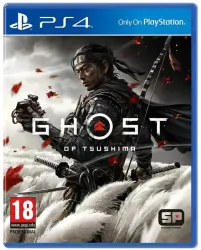
Ghost of Tsushima+IMMORTALS FENYX RISING+6 Games EU/RU PS4/PS5 Activation
Important notice
Any third-party trademarks, brand names, and product names referenced on this website are used solely to identify the relevant goods/services and, where applicable, to indicate intended purpose or compatibility. No affiliation, authorization, sponsorship, or endorsement by the trademark owners is implied unless expressly stated.
We are pleased to provide you with the opportunity to download games from your purchased account to your personal profile and enjoy playing your favorite games without paying attention to the blocking of PSN in Russia.
Account country: EU
Ghost of Tsushima: Legends (in Russian)
Back 4 Blood : Édition Standard PS4 & PS5 (in Russian)
FIFA 22 PS4™
Borderlands 3 PS4™ & PS5™ (in Russian)
IMMORTALS FENYX RISING PS4 & PS5
Dark Alliance (in Russian)
Baldur´s Gate: Dark Alliance
Hood: Outlaws & Legends (in Russian)
+ there may be additional games
Instructions for use:
1. Create a new user. Not a One-Time Guest, but a User (the "Start" Button).
On the home screen, select your user (Top right icon)
Next: "Change user" - "Add user" - "Getting started".
2. Next, enter the username and password for the purchased account.
3. Click the "Log in" button.
4. On the home screen, go to the right to the "Game Library" tab. Log in to the Library and set the desired game to download. Download everything that interests you.
5. After adding the games to the download, select your profile at the top right and then "Log out"
6. Log in to your user and wait for the full download of the game.
To view the download status of the game:
Click the "PS" button, Then select in the lower menu: "Downloads from the network/Online."
When the game is FULLY downloaded, you can play.
 Top up
 Games
Games Discounts 90%
 AI
AI Windows
 Subsctiptions
 New Games
 Mobile Games