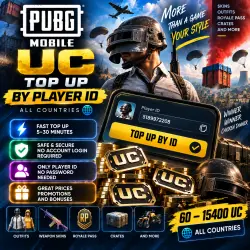
PUBG Mobile UC | 60–15400 UC | Top Up by Player ID | 24/7
Important notice
Any third-party trademarks, brand names, and product names referenced on this website are used solely to identify the relevant goods/services and, where applicable, to indicate intended purpose or compatibility. No affiliation, authorization, sponsorship, or endorsement by the trademark owners is implied unless expressly stated.
About the product
💎 PUBG MOBILE UC — TOP UP BY PLAYER ID
⚡ FAST PUBG MOBILE TOP UP
After payment, the selected amount of UC will be credited directly to the PUBG Mobile account associated with the Player ID provided in your order.
🔑 No redemption code is provided.
🔐 No account login or password is required.
Only your correct PUBG Mobile Player ID is required.
━━━━━━━━━━━━━━━━━━
📌 PRODUCT INFORMATION
━━━━━━━━━━━━━━━━━━
🎮 Game: PUBG Mobile
💎 Product: UC
💰 Amount: 60–15400 UC
🆔 Delivery method: Player ID Top Up
🔑 Redemption code: NOT required
🔐 Login & password: NOT required
UC is the in-game currency used in PUBG Mobile.
It can be used for eligible in-game purchases, including:
🎟️ Royale Pass
👕 Outfits and cosmetics
🔫 Weapon skins
📦 Crates
✨ Other available in-game items
━━━━━━━━━━━━━━━━━━
🆔 WHAT WE NEED FROM YOU
━━━━━━━━━━━━━━━━━━
To complete your top-up, provide:
➡️ Your PUBG Mobile Player ID.
❗ Carefully check your Player ID before completing the purchase.
Your password, verification codes and other account login information are NOT required.
━━━━━━━━━━━━━━━━━━
🛒 HOW TO ORDER
━━━━━━━━━━━━━━━━━━
1️⃣ Select the required amount of UC.
2️⃣ Enter your PUBG Mobile Player ID in the required field.
3️⃣ Carefully check the Player ID.
4️⃣ Complete the payment.
5️⃣ Wait for the top-up to be completed.
6️⃣ Open PUBG Mobile and check your UC balance.
━━━━━━━━━━━━━━━━━━
⚠️ THIS IS NOT A CODE
━━━━━━━━━━━━━━━━━━
❗ You are purchasing a direct PUBG Mobile account top-up using your Player ID.
No digital redemption code will be provided.
You do not need to redeem a code on a third-party website.
━━━━━━━━━━━━━━━━━━
⚠️ IMPORTANT BEFORE PURCHASE
━━━━━━━━━━━━━━━━━━
❗ Always provide the correct Player ID.
❗ Check the selected amount of UC before purchasing.
❗ Never provide your account password.
❗ Never share verification codes or other login credentials.
❗ Do not change information required to complete the top-up while your order is being processed.
━━━━━━━━━━━━━━━━━━
🛡️ IF YOU EXPERIENCE A PROBLEM
━━━━━━━━━━━━━━━━━━
If the UC does not appear after your order is completed:
1️⃣ Restart PUBG Mobile.
2️⃣ Check your UC balance again.
3️⃣ Make sure you are checking the account whose Player ID was entered during purchase.
4️⃣ If the balance has not changed, contact the seller through GGsel.
We will check the order status and help resolve the issue.
━━━━━━━━━━━━━━━━━━
↩️ REFUNDS & INCORRECT PLAYER ID
━━━━━━━━━━━━━━━━━━
❗ Please pay special attention when entering your Player ID.
If an incorrect Player ID was provided by the buyer and the top-up was successfully completed to that account, reversing the transaction or transferring the UC to another account may not be possible.
After a successful top-up, the digital product cannot be returned or exchanged, except where required by marketplace rules or applicable law.
If an issue was caused by the seller, contact us through GGsel messages so the order can be investigated.
━━━━━━━━━━━━━━━━━━
❤️ THANK YOU FOR YOUR PURCHASE!
━━━━━━━━━━━━━━━━━━
📦 Orders accepted — 24/7
💬 Support through GGsel messages
⭐ We would appreciate a positive review!
🕐 Support hours: daily from 10:00 to 22:00 Moscow Time (MSK)
 Top up
 Games
Games Discounts 90%
 AI
AI Windows
 Subsctiptions
 New Games
 Mobile Games