


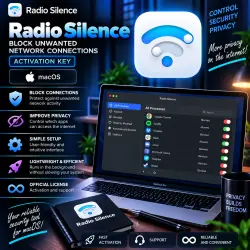
Radio Silence macOS Key Lifetime
Important notice
Any third-party trademarks, brand names, and product names referenced on this website are used solely to identify the relevant goods/services and, where applicable, to indicate intended purpose or compatibility. No affiliation, authorization, sponsorship, or endorsement by the trademark owners is implied unless expressly stated.
About the product
🛡️ Radio Silence macOS — OFFICIAL LICENSE KEY | LIFETIME
━━━━━━━━━━━━━━━━━━
🔑 Product Type — License Key
♾️ License Term — LIFETIME
🍏 Platform — macOS
🤝 Key provided through the seller's partner account
📧 License Delivery — to your e-mail
🔄 Updates supported
🔑 Key format:
XXXXX-XXXXX-XXXXX-XXXXX-XXXXX
━━━━━━━━━━━━━━━━━━
📦 YOU RECEIVE
✅ Radio Silence license key
✅ Lifetime license
✅ macOS version
✅ Software updates
✅ Key delivery to your specified e-mail
✅ Seller support for delivery and activation questions
━━━━━━━━━━━━━━━━━━
📧 HOW TO RECEIVE YOUR KEY
1️⃣ BEFORE clicking the “Buy” button, fill in the “E-mail” field.
2️⃣ Enter a valid e-mail address.
3️⃣ Make sure the address is correct.
4️⃣ After your order is processed, the license / key will be sent to your e-mail.
5️⃣ Check your Inbox and Spam/Junk folders.
━━━━━━━━━━━━━━━━━━
🔑 ACTIVATION
1️⃣ Download and install Radio Silence.
2️⃣ Launch the application.
3️⃣ Open the license / activation section.
4️⃣ Enter the license key you received.
5️⃣ Complete the activation — done!
━━━━━━━━━━━━━━━━━━
🔥 RADIO SILENCE FEATURES
🔹 Control application network access
🔹 Block individual applications from accessing the Internet
🔹 Restrict unwanted network connections
🔹 Add applications to the block list
🔹 View network activity
🔹 Monitor connections
🔹 Simple rule management
🔹 No constant pop-up notifications
🔹 Minimalist interface
🔹 Low system resource usage
🛡️ Radio Silence allows you to quickly prevent selected applications from accessing the network without configuring complex firewall rules.
━━━━━━━━━━━━━━━━━━
🍏 FOR MAC
💻 Designed for macOS.
⚡ Compatible with supported Intel and Apple Silicon Macs.
🔕 Designed to work quietly in the background without unnecessary notifications.
⚠️ Individual features and compatibility depend on the current Radio Silence and macOS versions.
━━━━━━━━━━━━━━━━━━
⚠️ IMPORTANT WHEN UNINSTALLING
📌 If you need to completely remove Radio Silence, use the developer's recommended uninstall procedure.
⚠️ Simply moving the application to Trash may not remove all related network components.
━━━━━━━━━━━━━━━━━━
⚠️ BEFORE PURCHASE
📌 macOS only.
📌 Lifetime license.
📌 Key provided through the seller's partner account.
📌 Updates supported.
📌 Key delivered to your specified e-mail.
📌 Check compatibility of the current Radio Silence version with your macOS version and Mac model before purchasing.
━━━━━━━━━━━━━━━━━━
🕐 DELIVERY & SUPPORT
📨 Key delivery — 05:00–19:00 Moscow Time (MSK)
🛠️ Store working hours — 09:00–00:00 Moscow Time (MSK)
🌙 Orders are processed according to the schedule above.
━━━━━━━━━━━━━━━━━━
🛡️ Radio Silence
🍏 macOS
🔑 License Key
♾️ LIFETIME
🔄 Updates
📧 E-mail Delivery
 Top up
 Games
 Steam Sales
 AI
 Subscriptions
 Windows
 New Games
 Mobile Games