
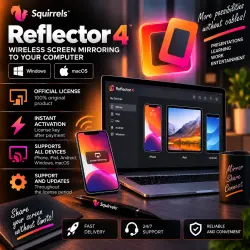
Reflector 4 Win/macOS Key Lifetime
Important notice
Any third-party trademarks, brand names, and product names referenced on this website are used solely to identify the relevant goods/services and, where applicable, to indicate intended purpose or compatibility. No affiliation, authorization, sponsorship, or endorsement by the trademark owners is implied unless expressly stated.
About the product
🖥️ Reflector 4 Windows / macOS — ACTIVATION KEY | LIFETIME
━━━━━━━━━━━━━━━━━━
🔑 Product Type — Digital Activation Key
♾️ License Term — LIFETIME
💻 Windows / macOS
📧 Key Delivered to Your E-mail
🔄 Updates Supported
⚡ Key Delivery — 05:00–19:00 Moscow Time (MSK)
🕐 Store Support — 09:00–00:00 MSK
━━━━━━━━━━━━━━━━━━
📦 YOU RECEIVE
✅ Official Reflector 4 activation key
✅ Lifetime license
✅ Windows / macOS version
✅ Access to updates within the supported version
✅ License delivered to your specified e-mail
✅ Activation instructions
✅ Seller support
━━━━━━━━━━━━━━━━━━
🔑 KEY FORMAT
The license is provided as a digital activation key:
XXXXX-XXXXX-XXXXX-XXXXX-XXXXX
📦 The key is supplied through the seller's partner account.
📧 The license is sent to the e-mail address provided when placing your order.
━━━━━━━━━━━━━━━━━━
📧 HOW TO RECEIVE YOUR LICENSE
1️⃣ BEFORE clicking the “BUY” button, fill in the “E-mail” field.
2️⃣ Carefully enter a valid e-mail address.
3️⃣ Complete the payment.
4️⃣ After your order is processed, the Reflector 4 key will be sent to the specified e-mail address.
5️⃣ Check your inbox and Spam/Junk folder if the message does not appear immediately.
⚠️ Please verify your e-mail address carefully before payment.
━━━━━━━━━━━━━━━━━━
🔐 HOW TO ACTIVATE
1️⃣ Download and install Reflector 4.
2️⃣ Launch the application.
3️⃣ Open the activation / license section.
4️⃣ Enter the received activation key.
5️⃣ Complete the activation.
6️⃣ Done — Reflector 4 is activated.
━━━━━━━━━━━━━━━━━━
🔥 REFLECTOR 4 — SCREEN MIRRORING
🔹 Mirror mobile device screens to your computer
🔹 AirPlay support
🔹 Google Cast support
🔹 Support for compatible wireless casting technologies
🔹 Works with iPhone and iPad
🔹 Casting from compatible Apple devices
🔹 Multiple device connections
🔹 Convenient screen presentation
🔹 Useful tools for presentations and education
🔹 Recording and displaying mirrored content within the application's available features
━━━━━━━━━━━━━━━━━━
📱 DEVICE CONNECTION
Reflector 4 is installed on a Windows PC or Mac and allows the computer to act as a wireless screen-mirroring receiver for compatible devices.
🍎 iPhone / iPad / compatible Mac devices — AirPlay
📱 Compatible devices — Google Cast and other supported technologies
⚠️ Individual features may depend on the operating system, device and current Reflector 4 version.
━━━━━━━━━━━━━━━━━━
♾️ LIFETIME LICENSE
✅ One-time license purchase.
✅ No recurring subscription fee for the stated lifetime key.
✅ The key is intended for Reflector 4.
⚠️ A lifetime license means that the purchased version does not expire. It does not necessarily include future separately paid major product versions.
━━━━━━━━━━━━━━━━━━
⚠️ IMPORTANT
📌 This product is Reflector 4 — screen mirroring and casting software.
📌 This is NOT .NET Reflector.
📌 This is NOT the similarly named Linux/Python Reflector utility.
📌 Windows / macOS.
📌 Check your operating system and device compatibility with Reflector 4 before purchasing.
━━━━━━━━━━━━━━━━━━
⏳ KEY DELIVERY HOURS
⚡ Keys are delivered:
05:00–19:00 Moscow Time (MSK / GMT+3)
🌙 If your order is placed outside delivery hours, please wait until the next order processing period.
━━━━━━━━━━━━━━━━━━
🕐 STORE HOURS
⏰ Daily — 09:00–00:00 Moscow Time (MSK / GMT+3)
💬 For questions regarding key delivery or activation, contact the seller through your order correspondence.
━━━━━━━━━━━━━━━━━━
🖥️ Reflector 4
🔑 ACTIVATION KEY
♾️ LIFETIME
💻 Windows / macOS
📧 E-MAIL DELIVERY
🔄 UPDATES
⚡ 05:00–19:00 MSK
 Top up
 Games
Games Discounts 90%
 AI
AI Windows
 Subsctiptions
 New Games
 Mobile Games