


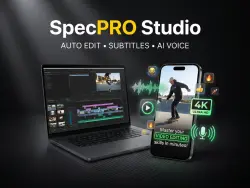
SpecPRO Studio — automated video editing for TikTok, Reels, and Shorts (Windows)
Important notice
Any third-party trademarks, brand names, and product names referenced on this website are used solely to identify the relevant goods/services and, where applicable, to indicate intended purpose or compatibility. No affiliation, authorization, sponsorship, or endorsement by the trademark owners is implied unless expressly stated.
A Windows program: just drag and drop a video onto the shortcut, and you’ll get a finished clip—complete with subtitles, a hook, music, and effects—in 4K. It runs locally on your PC, with no subscriptions and no watermarks.
SpecPRO Studio is an automated editing tool for short-form videos designed for TikTok, YouTube Shorts, Instagram Reels, and YouTube. Simply drag and drop your video onto the shortcut, adjust the settings using the menu, and get a finished clip. Everything runs locally on your computer—no cloud, no subscriptions, and no watermarks.
FEATURES
▪ Auto-subtitles — powered by speech recognition (Whisper), these feature large, 2–4 word captions with the current word highlighted. Multiple styles are available, with full support for Cyrillic. Languages include Russian, Ukrainian, Belarusian, and English, or you can use auto-detection.
▪ Opening "hooks" — the software automatically identifies the most compelling moment in your footage and places it at the very beginning, complete with a close-up, a title, a flash effect, and a transition sound.
▪ Silence removal — pauses between phrases are automatically trimmed, ensuring a tight, fast-paced flow of speech.
▪ Aspect ratio conversion — switch between 16:9, 9:16, and 1:1 (square) formats. Smart cropping tracks the action, or you can choose to display the full video against a blurred background.
▪ Effects — dynamic zoom-ins for emphasis, context-aware emojis, progress bars, vignettes, film grain, and color grading.
▪ Audio — royalty-free background music (with the option to add your own), automatic music ducking (lowering volume when you speak), and sound effects with adjustable volume levels.
▪ Outro — a freeze-frame ending featuring an animated "Subscribe" button and notification bell.
▪ "My Voice" (optional) — clone your own voice directly on your PC. After a one-time training session using 10–30 minutes of your audio, your voice will be used for the speech in your videos, while the original background music and ambient sounds remain intact.
▪ Quality — supports rendering up to 4K resolution. ▪ Convenience — a menu available before rendering, all settings consolidated in a single text file, automatic cleanup of temporary working files, and a detailed manual (provided in both PDF and Word formats, 28 pages).
SYSTEM REQUIREMENTS
▪ Windows 10/11 (64-bit)
▪ 8 GB of RAM (16 GB recommended)
▪ Approximately 5 GB of disk space (an additional 10–15 GB is required if installing the "My Voice" module)
▪ Internet connection — required only for the initial installation
▪ For the "My Voice" module — an NVIDIA graphics card with at least 6 GB of VRAM
WHAT YOU WILL RECEIVE
An archive containing the program and an installer (which automatically downloads and configures all necessary components), along with a manual in PDF and Word formats.
LICENSES
The software is built upon Remotion (free for individuals and companies with up to 3 employees; larger organizations require a separate Remotion license), Whisper (MIT), and Applio/RVC (MIT). The music and sound effects were created exclusively for this program. Please clone only your own voice or the voice of an individual who has provided their consent.
#SpecPROStudio #автомонтаж #монтажвидео #субтитры #tiktok #reels #shorts #вертикальноевидео #видеоредактор #клонированиеголоса #дляблогеров
 Top up
 Games
 Discounts 90%
 AI
 Windows
 Subsctiptions
 New Games
 Mobile Games