
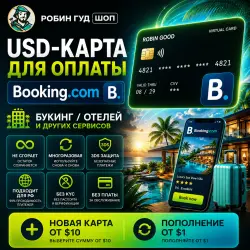
USD CARD FOR PAYING BOOKING.COM / BOOKING / HOTELS · 3DS · DOES NOT EXPIRE
Important notice
Any third-party trademarks, brand names, and product names referenced on this website are used solely to identify the relevant goods/services and, where applicable, to indicate intended purpose or compatibility. No affiliation, authorization, sponsorship, or endorsement by the trademark owners is implied unless expressly stated.
About the product
⚠️ New card is issued ONLY from $10
🏨 USD CARD FOR BOOKING.COM / BOOKING / HOTELS 💳
Need to book a hotel on Booking / Booking.com, but your card does not work?
➔ You get a payment card: number, expiry date, CVV and billing details. Add it to Booking yourself and pay on your own account ✅
This is NOT a Booking account, NOT a ready booking and NOT manual payment by seller. You choose the hotel, dates, terms and pay by card yourself.
🔥 NO KYC / SUITABLE FOR RU / BEST RATE
No passport, KYC or ID verification required.
Based on our experience, this method works reliably for RU users.
You pay only for card issue. Then top up the same card at a good rate with no service fee.
♻️ REUSABLE CARD
The card stays with you after paying for Booking / hotel and can be used again.
✔️ Remaining balance is saved
✔️ Balance, history and notifications are in your personal account
✔️ Use the same card again and again
🏨 WHAT CAN YOU PAY FOR?
Booking / Booking.com
Hotel bookings
Apartments
Travel services
Online accommodation payments
Other international payment pages where cards are accepted
📦 WHAT YOU RECEIVE
📜 Step-by-step instructions for adding the card to Booking
💳 Card details:
- Card number
- Expiry date
- CVV
- Billing details
📊 Access to balance and transaction history
💬 Support via the order chat
🔄 Ability to top up the same card without issuing a new one
Card region: Hong Kong or Singapore, depending on availability.
👇🏻 CHOOSE AN OPTION
🆕 No card yet?
Choose "New Card" and select $10 OR MORE.
🔄 Already have our card?
Choose "Card Top-Up" and select any amount from $5.
The selected amount will be added to your card balance.
🏨 WHAT AMOUNT TO CHOOSE?
We recommend selecting a balance slightly higher than your payment amount because Booking or the hotel may temporarily hold a verification amount, tax, fee or pre-authorization.
Examples:
- About $80 → choose $100
- About $170 → choose $200
- About $450 → choose $500
📌 HOW IT WORKS
1️⃣ Choose "New Card" or "Card Top-Up" and select the balance amount.
2️⃣ Pay for the order and activate it by following the instructions.
3️⃣ We send you the card details and instructions for Booking.
4️⃣ Add the card to Booking and complete your payment ✅
💡 BALANCE, FEES AND CHARGES
- The full selected amount is credited to your card balance.
- Booking or the hotel may temporarily hold a small verification amount.
- A $0.75 fee is charged for each successful payment.
- A $0.75 fee is also charged for each declined payment.
- Some services may additionally charge taxes or fees. If your balance is insufficient, an additional top-up may be required.
⚠️ IMPORTANT
We provide a working card and correct billing details. The final payment decision is made by the service and the payment system.
🛡️ IF PAYMENT FAILS
1. Do not make multiple payment attempts in a row.
2. Send a screenshot of the error in the order chat - we will help identify the issue and suggest the next step.
3. If the problem is related to the card, we will help resolve it.
🔎 Booking, Booking.com, hotel booking, pay hotel by card, card for Booking, travel services, hotels, apartments, trips, online booking
 Top up
 Games
Games Discounts 90%
 AI
AI Windows
 Subsctiptions
 New Games
 Mobile Games