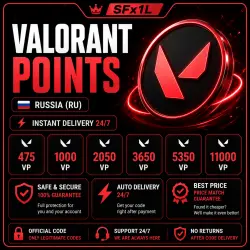
VALORANT 475 POINTS RU AUTO DELIVERY 24/7 OFFICIAL CODE
Important notice
Any third-party trademarks, brand names, and product names referenced on this website are used solely to identify the relevant goods/services and, where applicable, to indicate intended purpose or compatibility. No affiliation, authorization, sponsorship, or endorsement by the trademark owners is implied unless expressly stated.
╔═══════ ✦ 🎮 ✦ ═══════╗
💥 AUTOMATIC DELIVERY 24/7 💥
╚═══════ ✦ 🎮 ✦ ══════╝
⚡ After payment, you will automatically receive an activation code.
⏳ No waiting for the seller.
❤️ BEST PRICE ❤️
━━━━━━━━━━━━━━━━━━━━━━
⚠️ IMPORTANT INFORMATION
━━━━━━━━━━━━━━━━━━━━
✅ The code is intended for accounts in the Russia (RU) region.
✅ Activation is performed through the VALORANT game client on PC.
❗ We recommend recording your screen from the moment of payment until the code is activated.
Claims for codes already received will not be processed without a video recording.
🚫 Returns or exchanges are not possible after receiving a digital product.
━━━━━━━━━━━━━━━━━━━━━━
📦 HOW TO GET A CODE
━━━━━━━━━━━━━━━━━━━━━
1️⃣ Select the desired denomination.
2️⃣ Pay for your order.
3️⃣ After payment, stay on the order page.
4️⃣ The system will automatically generate an activation code.
━━━━━━━━━━━━━━━━━━━━━
🎯 CODE ACTIVATION
━━━━━━━━━━━━━━━━━━━━
1️⃣ Launch VALORANT on PC.
2️⃣ Open the "Store" tab.
3️⃣ Click the VALORANT Points icon.
4️⃣ Select "Prepaid Cards & Codes".
5️⃣ Enter the code you received.
6️⃣ Click "Submit".
🎉 Done! VALORANT points will be credited to your account.
 Top up
 Games
Games Discounts 90%
 AI
AI Windows
 Subsctiptions
 New Games
 Mobile Games