
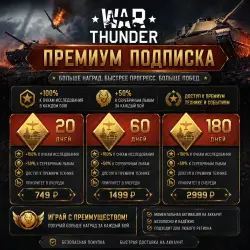
War Thunder - Premium subscription - RF REGION - PC/Playstation ( Russia ONLY )
Important notice
Any third-party trademarks, brand names, and product names referenced on this website are used solely to identify the relevant goods/services and, where applicable, to indicate intended purpose or compatibility. No affiliation, authorization, sponsorship, or endorsement by the trademark owners is implied unless expressly stated.
About the product
❗❗❗Russian account ONLY❗❗❗
🔥 Get a War Thunder premium subscription for your account quickly and affordably!
⚔️ Premium account benefits:
• +100% vehicle and module research
• Increased Silver Lion income
• Faster aircraft, tank, and naval advancement
• Additional customization options
• Comfortable gameplay without long grinds
• Ideal for both beginners and experienced players
🔥 Available subscription options:
• 20 days — ₽749
• 60 days — ₽1,499
• 180 days — ₽2,999
🚀 With premium, you unlock top vehicles faster, earn more rewards for each battle, and save dozens of hours of advancement. That's why many players consider premium account the most profitable investment in War Thunder.
✅ Safe and secure
✅ Suitable for any region
✅ Fast delivery to your account
Play more efficiently. Earn more. Dominate the battlefield with a War Thunder premium subscription!
❗❗❗Only suitable for the PC version with a Russian account region❗❗❗
❗❗❗To receive the product, you must enable two-step authentication on your account. Learn how below❗❗❗
❓ Answers to the most frequently asked questions:
1) Is my account eligible for purchasing a subscription?
• For a Gaijin account - Go to your account page (https://store.gaijin.net/user.php?skin_lang=ru). If you have a Gaijin account, two-step authentication is enabled, and the country field says "Russian Federation," then your account is eligible for this service.
• For a Pixselstorm account {Remember, you can buy currency through the Fast Payment System (FPS) without an intermediary}, follow the link (https://store.pixstorm.ru/user.php). If your account is there and has two-step verification, it's eligible.
2) How do I enable two-step verification on my account?
• For a Gaijin account — Go to your account security settings page (https://login.gaijin.net/ru/profile/settings/security). Select either "Two-step verification" or "Two-step verification via email." Then enable it!
• For a Pixselstorm account — Go to the page (https://login.pixstorm.ru/ru/profile/settings/security), select "Two-step verification via email." Then enable it!
3) What do I need to do to get a subscription for my account?
• Enter your profile ID in the field (for a Gaijin account: https://store.gaijin.net/user.php?skin_lang=ru); (for a Pixelstorm account: https://store.pixstorm.ru/user.php).
• Pay for your purchase.
• Your gift will arrive shortly (it will be on the page "https://store.gaijin.net/user.php?view=gifts" {Gajin} or on the page "https://store.pixstorm.ru/user.php?view=gifts" {Pixelstorm}).
• Accept this gift.
• Done!
4) Is this offer valid for the PlayStation version of the game?
• If you have a Gaijin account on PlayStation, it is valid.
5) Is a refund provided?
• A full refund is issued if the in-game currency was not delivered due to the seller's fault. If this happened due to the buyer’s fault, then only half the cost will be refunded to him!

 Top up
 Games
Games Discounts 90%
 AI
AI Windows
 Subsctiptions
 New Games
 Mobile Games