
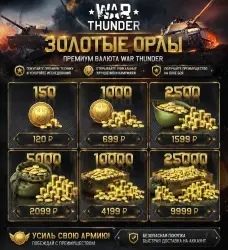
War Thunder — Golden Eagles — Russian Federation — PC ( Russia ONLY )
Important notice
Any third-party trademarks, brand names, and product names referenced on this website are used solely to identify the relevant goods/services and, where applicable, to indicate intended purpose or compatibility. No affiliation, authorization, sponsorship, or endorsement by the trademark owners is implied unless expressly stated.
About the product
❗❗❗Russian account ONLY❗❗❗
🔥 Top up your War Thunder balance instantly and profitably!
Buy Golden Eagles at great prices and unlock maximum in-game opportunities: premium vehicles, accelerated upgrades, exclusive camouflages, and rare upgrades.
⚡ Why choose us:
• Fast delivery to your account
• Safe and secure purchase
• Lowest prices on the market
• Support and assistance with ordering
💰 Available packs:
• 150 ZO - 120 ₽
• 1000 ZO - 699 ₽
• 2500 ZO - 1599 ₽
• 5000 ZO - 2099 ₽
• 10000 ZO - 4199 ₽
• 25000 ZO - 9999 ₽
🚀 Strengthen your army today - dominate battles with an advantage!
❗❗❗Only suitable for the PC version with a Russian account region❗❗❗
❓ Answers to the most frequently asked questions:
1) Is my account eligible for balance top-up?
• For a Gaijin account - Go to your account page (https://store.gaijin.net/user.php?skin_lang=ru). If you have a Gaijin account, two-step verification is enabled, and the country field says "Russian Federation", then your account is eligible for this service.
• For a Pixselstorm account (Remember, you can buy currency through the Fast Payment System (FPS) without an intermediary for this account), follow the link (https://store.pixstorm.ru/user.php). If your account is listed there and has two-step verification, it is eligible.
2) How do I enable two-step verification on my account?
• For a Gaijin account — Go to your account security settings page (https://login.gaijin.net/ru/profile/settings/security). Select either "Two-step verification" or "Two-step verification via email." Then enable it!
• For a Pixselstorm account — Go to the page (https://login.pixstorm.ru/ru/profile/settings/security), select "Two-step verification via email." Then enable it!
3) What do I need to do to get Golden Eagles?
• Enter your profile ID in the field (for a Gaijin account: https://store.gaijin.net/user.php?skin_lang=ru); (for a Pixelstorm account: https://store.pixstorm.ru/user.php).
• Pay for your purchase.
• A gift will be sent to you soon (it will be on the page "https://store.gaijin.net/user.php?view=gifts" {Gajin} or on the page "https://store.pixstorm.ru/user.php?view=gifts" {Pixelstorm}).
• Accept this gift.
• Done!
4) Is this offer valid for the PlayStation version of the game?
• Yes, it is.

 Top up
 Games
Games Discounts 90%
 AI
AI Windows
 Subsctiptions
 New Games
 Mobile Games